Stop onboarding your AI every Monday.
Cowork Projects can keep recurring instructions with related work. They are private to their creator, and a listed attachment is not a promise that every task can read it.
Read the article →Unpaid promotion · Created by Copilot Newsdesk
Practical commentary and useful resources for Copilot at work.
Cowork Projects can keep recurring instructions with related work. They are private to their creator, and a listed attachment is not a promise that every task can read it.
Read the article →Microsoft’s new Work IQ Retrieve tool separates finding evidence from delegating work. That is a useful distinction for anyone commissioning an internal AI assistant.
Read the article →Before rewriting a working prompt, check its sources, compare a harmless task and ask IT about service health. Sometimes the prompt is fine.
Read the article →Office inside Copilot promises a smoother handoff from AI draft to team edits. The useful habit is one shared file, named reviewers and an owner.
Read the article →Microsoft’s new beta Cost Management API separates credit limits, alerts and usage diagnostics. None of those replaces a person who owns the spending decision.
Read the article →A workplace policy can restrict web search while Copilot still answers from permitted internal sources. Check the evidence when freshness matters.
Read the article →The add-on label is changing now, and December brings new purchase options. Easier purchasing does not supply every Microsoft 365 app entitlement.
Read the article →New Copilot Studio triggers can start work from an event or a schedule. Try a bounded finance task before handing over the whole process.
Read the article →Add work content, upload a file, or attach from OneDrive? Here’s what the choices mean—and why browser, app and Teams instructions can differ.
Read the article →Skills are coming to Copilot Chat. Start with a recurring team task—and check the sharing rules before sending everyone to look for it.
Read the article →New Dynamics 365 skills make a useful training point: proposed, approved and completed are three different things.
Read the article →PowerPoint’s Clarify my thinking skill offers questions and feedback. Give it an argument to examine, not just slides to polish.
Read the article →The planned shortcut removal has been cancelled. Check MC1477999 before sending instructions for a change that is no longer proceeding.
Read the article →Copilot Search is adding contextual chat. Start with the right document, then check what the answer used.
Read the article →Ask about the cutoff. Then check the sources. A confident answer about a model’s age is still an answer that needs checking.
Read the article →Excel can help you find Copilot’s edits. Use that trail to check the result before passing it along.
Read the article →Agents is becoming Plugins. A small navigation change needs a clear explanation for the people using it.
Read the article →Request access and Request more have a destination. That still leaves the question of who can actually say yes.
Read the article →Work IQ is expanding business context. First, get the departments to agree what their records mean.
Read the article →Microsoft plans to route requests between Chat, Cowork and Code. Easier navigation still needs a clear spending conversation.
Read the article →Cowork is a good puppy. Explain the separate usage bill before the department gets attached.
Read the article →From December 1, eligible new Copilot Business purchases through CSP have usage billing configured by default. Check the 4,000-credit limit before ordering.
Read the article →A tidy summary still needs checking. Copilot’s side-by-side email view makes that a little less annoying.
Read the article →Apparently the recipe arrived without the oven settings. A useful shared prompt needs its files, context and setup—not just the words.
Read the article →Copilot Cowork and Copilot Studio are getting conversational app building. Great. Now decide who owns the app after the demo.
Read the article →A Copilot workflow can create an environment you won’t find in the usual list. Here’s where the controls actually live—and why IT deserves a heads-up.
Read the article →A prompt gallery should turn individual AI experiments into shared organizational know-how. First, people have to find it. Here’s the naming mess—and how to navigate it.
Read the article →An agent does not need the whole filing cabinet for every question. Start with the relevant SharePoint content, then check what it can actually retrieve before handing it to the department.
Read the source at learn.microsoft.com ↗Try a small analysis you already know how to check. Ask Copilot to explain its method, then compare the result with your existing calculation. A lovely chart can still be wrong. Microsoft listed Python editing in its August 25 release notes; check whether Edit with Copilot has reached your account before promising the team a demonstration.
Read the source at learn.microsoft.com ↗Type /cost in a Cowork task to see roughly what it has used. Useful, although the price arrives after you start the job. Try it on a small, repeatable task before making that task everyone’s new daily habit. Treat the result as an estimate; use your organization’s billing records for the actual bill.
Read the source at learn.microsoft.com ↗Reusable skills are the part of this update worth a look. If someone has worked out a reliable way to handle a task, package the instructions and give the next agent builder a starting point. Then test it with that agent’s tools and data. Sharing the instructions saves work; it doesn’t make every setup identical.
Read the source at www.microsoft.com ↗A report of missing controls or failed responses is useful context. It is not a live health check for your organization. Check the date, follow the source, and have your administrator confirm the tenant's status before treating this as the explanation for your problem.
Read the source at thedailytechfeed.com ↗When a tool suddenly stops behaving, people can waste a lot of time trying to fix their own instructions. This report is a reason to check official service information. It is not proof that your organization is affected, or that the reported incident is still active.
Read the source at cybersecuritynews.com ↗This is where the naming gets in the way. Two people can both say they use Copilot and have very different access. Before comparing results—or writing training—check the product, the license, and the app. The login alone does not settle it.
Read the source at learn.microsoft.com ↗Charging for Cowork changes the budget conversation. So ‘we already pay for Copilot’ is not where I would stop the conversation. Read the credits guide, separate subscription costs from usage, and model a real task before multiplying it across the organization.
Read the source at cdn-dynmedia-1.microsoft.com ↗Bringing a Teams message into Copilot with its context could remove a little daily friction. I would still check what context comes along and what stays behind. Small interface changes can make a useful workflow easier—or leave people wondering why the same prompt now behaves differently.
Read the source at uc.lawedo.net ↗The public Message Center archive’s September 29 update moves the planned Teams Copilot redesign to October 2026, previously September. The full-screen experience includes Tasks; the side pane does not. A cleaner Teams experience sounds good. It also means the instructions people learned may no longer match the screen in front of them. Before updating training, check the actual rollout and capture the interface your team has. A roadmap screenshot is not everybody's reality.
Read the source at mc.merill.net ↗Microsoft's announcements are a useful starting point. My filter is straightforward: does this change something my team can do, something we need to learn, or something we have to pay for? That is what I want to pull out of the product news.
Read the source at www.microsoft.com ↗Starting from the application and the task makes sense to me. Managers know the work they want done; they should not need to become agent architects to describe it. This is a roadmap item to watch, with rollout timing to verify before promising anything to your team.
Read the source at mc.merill.net ↗A more consistent experience would be a welcome change. People should not need another orientation every time they open an agent. This roadmap item is worth watching, but an announced improvement is not proof that it has reached your account. Check the experience your team actually sees.
Read the source at mc.merill.net ↗Turning a description into an app is a compelling demo. My next questions are less glamorous: who owns it, what data does it touch, and who fixes it next month? Explore the announcement, then put those questions beside the feature list before using it for real work.
Read the source at www.microsoft.com ↗I like the idea of starting with an outcome and breaking the work into steps. But ‘handle this for me’ leaves a lot of room for interpretation. This guide is worth a look for the setup and approval points. Pick one contained task before handing over the whole process.
Read the source at www.aguidetocloud.com ↗Connecting Copilot to a workflow is interesting. The management question is what happens when that step gets something wrong. Who checks the result? Where does the work stop? I would write those rules down before adding more agents to the chain.
Read the source at learn.microsoft.com ↗This is the kind of workflow I want to investigate: a job people repeat, with a clear starting point and a result they can check. Start small. A reliable first draft or handoff is more useful than a sprawling automation nobody wants to troubleshoot.
Read the source at support.microsoft.com ↗If you are handing over several steps of a job, ‘give me an answer’ is not much of a brief. I want the outcome, the boundaries, and the points where a human has to approve the next move. Start there before turning a recurring task over to Cowork.
Read the source at learn.microsoft.com ↗Before everyone starts using an agent, I want three answers: what can it access, who can use it, and where does the charge land? The demo can wait a minute. Those answers decide whether this is a useful team tool or another budget surprise.
Read the source at learn.microsoft.com ↗A tidy bundle makes buying easier. It does not necessarily make the final bill predictable. I would put Cowork usage next to the per-person price before comparing these plans. That is the number a manager has to explain when the invoice arrives.
Read the source at www.microsoft.com ↗The word I would circle here is ‘metered.’ Before rolling Copilot out to a team, separate the subscription from the work that can generate additional charges. A feature being available and a feature being included in the price are two different budget conversations.
Read the source at www.microsoft.com ↗
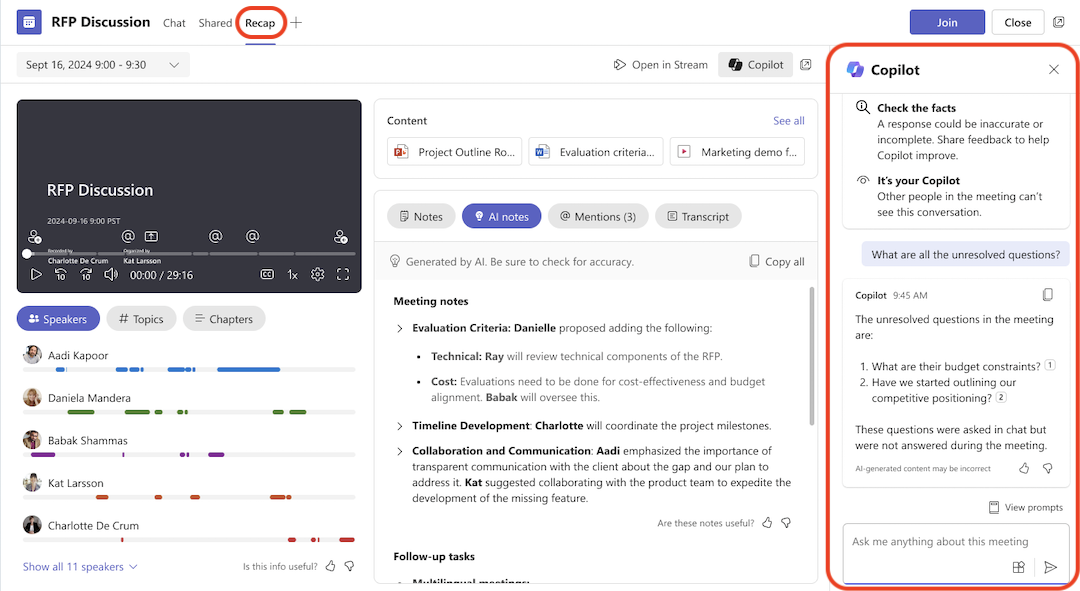
Preview unavailable · open original screenshot ↗Source-provided screenshot. Capture date not published; your rollout and license may differ.
Share a useful prompt for Excel, Word, Outlook, PowerPoint, Teams or Copilot Cowork—or an agent you’ve built. A little context turns one person’s experiment into someone else’s starting point.
Explore Prompt Collector →